
How to Calculate Total Income from W2: Every January, employee sends a small document that holds the key to your entire tax year, the W-2 form. It tells the IRS what you earned, what was withheld and what benefits you received. But for millions of people, it raises more questions than it answers. Why doesn’t it match your pay stub? Which box shows your “real” income? And how do you actually calculate your total income from a W-2?
Understanding your W-2 is not just a tax-season chore. It is a window into your full financial picture and knowing how to read it puts you in control.
If you want to skip the manual math, our W-2 Income Calculator does this work for you, just enter your box values and get a clear breakdown of your gross income, taxable wages, taxes withheld and take-home pay in seconds.
This guide explain in detail clearly and completely. Whether you are filing your tax return, applying for a mortgage or just trying to understand where your money went, knowing how to read and calculate income from your W-2 is one of the most useful financial skills you can have.
What Is a W-2 Form?
The W-2, officially called the Wage and Tax Statement, is a federal tax form that your employer is required to send you by January 31 each year. It summarizes everything your employer paid you and everything they withheld on your behalf during the previous calendar year.
The IRS uses this form to cross-check the income you report on your tax return. Your employer files a copy directly with the IRS which means the numbers the government sees and the numbers you report must match.
The W-2 is also not just one number. It is a collection of boxes with each reporting a different slice of your compensation under different tax rules. That’s exactly why it can feel confusing when you first look at it.
Why Your W-2 Doesn’t Match Your Pay Stub?
Before diving into the boxes, here is the single most important thing to understand: your W-2 wages and your gross pay are almost never the same number.
Your final pay stub of the year shows total gross earnings, every dollar you were paid before anything was taken out. Your W-2 shows taxable wages, which means gross pay has already been reduced by pre-tax deductions like your 401(k) contributions, health insurance premiums, HSA contributions, dental and vision coverage and flexible spending account (FSA) contributions.
This is normal. It is not an error. The difference is intentional and it reflects the tax-advantaged structure of your benefits.
For example: if you earned $70,000 in gross wages but contributed $5,000 to a traditional 401(k) and $2,000 toward health insurance premiums, your Box 1 taxable wages would show $63,000 not $70,000.
The Key Boxes on Your W-2 Form And What They Mean
Box 1: Wages, Tips and Other Compensation
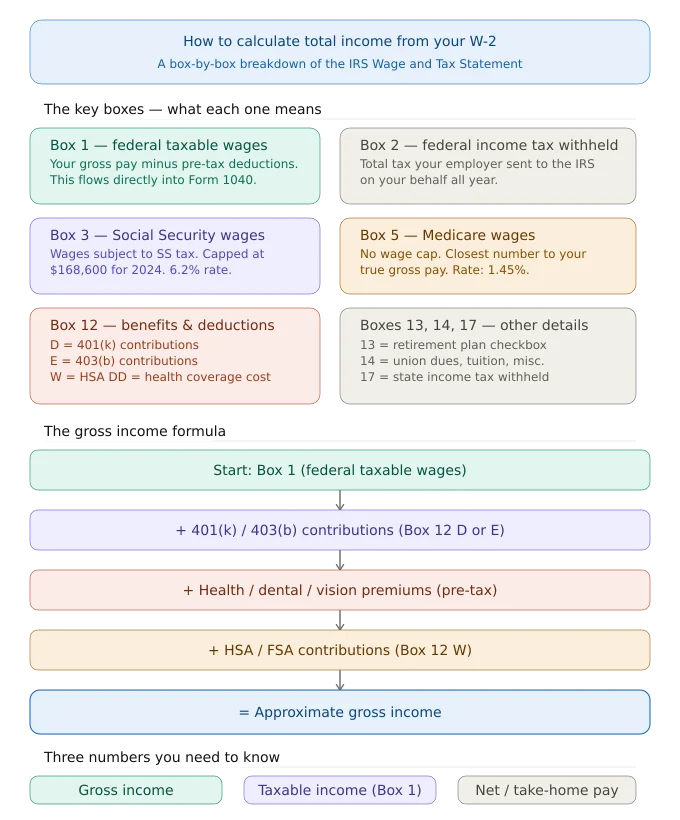
This is the starting point for most people. Box 1 shows your federal taxable income and your gross wages minus pre-tax deductions that are exempt from federal income tax. This is the number that flows directly into your federal tax return (Form 1040).
It includes your regular salary or wages, tips you reported, bonuses, taxable fringe benefits and the taxable portion of group-term life insurance over $50,000.
It does not include your pre-tax 401(k) contributions, traditional IRA payroll deductions, health insurance premiums paid through your employer’s Section 125 cafeteria plan or HSA contributions deducted from your paycheck.
Box 2: Federal Income Tax Withheld
This is how much federal income tax your employer already sent to the IRS on your behalf. When you file your tax return, this amount reduces what you owe or increases your refund.
Box 3: Social Security Wages
Box 3 shows the wages subject to Social Security tax. This number can differ from Box 1 because retirement contributions like 401(k) and 403(b) reduce your federal taxable income (Box 1) but not your Social Security wages. There is an annual Social Security wage base cap for 2024, that cap is $168,600. If you earned more than this, Box 3 will be capped at that amount even if Box 5 is higher.
Box 4: Social Security Tax Withheld
The total Social Security tax withheld from your paychecks. The employee rate is 6.2%, and your employer matches it. This box should equal exactly 6.2% of Box 3.
Box 5: Medicare Wages and Tips
Medicare wages are similar to Social Security wages, but with one important difference: there is no cap. Every dollar you earn is subject to Medicare tax. This makes Box 5 one of the most accurate representations of your total compensation for the year and it is often the closest number to your actual gross pay.
Box 6: Medicare Tax Withheld
This equals 1.45% of your Box 5 wages. If you earned over $200,000, an additional 0.9% Additional Medicare Tax applies.
Box 12: Codes for Benefits and Deductions
Box 12 is where things get granular. It uses letter codes to report specific types of compensation and deductions:
- Code D: Elective deferrals to a traditional 401(k) plan.
- Code E: Elective deferrals to a 403(b) plan (common in education and nonprofits).
- Code W: Employer contributions to a Health Savings Account (HSA), including employee. contributions made through payroll deduction.
- Code DD: The cost of employer-sponsored health coverage (informational only and does not affect your taxes).
- Code AA and Code BB: Designated Roth contributions to a 401(k) or 403(b), respectively.
Pre-tax contributions shown in Box 12 (like Code D for a traditional 401(k)) directly reduced your Box 1 taxable income. Roth contributions (Code AA/BB) do not reduce Box 1 because they were made with after-tax dollars.
Box 13: Retirement Plan Checkbox
If this box is checked, your employer offered and you participated in a qualifying retirement plan. This matters because it can limit your ability to deduct traditional IRA contributions depending on your income.
Box 14: Other
Employers use Box 14 to report additional information that does not fit elsewhere and things like union dues, state disability insurance (SDI) withholding, tuition assistance, or employer-paid transportation benefits.
Box 17: State Income Tax Withheld
The total state income tax your employer withheld from your paychecks during the year.
Box 19: Local Income Tax Withheld
If you live or work in a locality that levies its own income tax, Box 19 shows what was withheld.
How to Calculate Total Income from a W-2: Step by Step
There is no single box on a W-2 that shows your total gross income. You have to reconstruct it. Here is how:
Step 1: Start with Box 1 (Federal Taxable Wages)
This is your baseline. It reflects everything you were paid that the IRS considers federally taxable.
Step 2: Add Back Pre-Tax Deductions from Box 12
To get closer to your true gross income, add back the pre-tax contributions listed in Box 12, your 401(k) deferrals (Code D or E), HSA contributions (Code W) and any other pre-tax deductions.
Step 3: Add Back Pre-Tax Benefit Premiums
If your employer deducted health insurance, dental, vision, FSA or commuter benefits from your paycheck before taxes, these reduced your Box 1 figure. Add these back using your final pay stub or benefits summary.
Step 4: Cross-Check with Box 5 (Medicare Wages)
Because Medicare has no wage cap and very few deductions reduce it, Box 5 is often the closest number to your gross compensation. Compare your result from Steps 1–3 to Box 5 as a sanity check.
Step 5: Add Any Non-W-2 Income
If you had freelance income, rental income, interest, dividends, or other income streams, those won’t appear on your W-2 at all. Add those to get your total gross income for the year.
Formula Summary:
Approximate Gross Income = Box 1 + 401(k)/403(b) contributions + Health/Dental/Vision premiums + HSA/FSA contributions + other pre-tax deductions
How to Calculate Total Income from W2 – Real-World Cases
Jacoline earns a $72,000 salary. During the year, she contributes $6,000 to her traditional 401(k), $2,400 in health insurance premiums and $1,800 to her HSA through payroll deduction.
Her W-2 shows:
- Box 1 (Federal Taxable Wages): $61,800
- Box 3 (Social Security Wages): $67,800 (401(k) added back)
- Box 5 (Medicare Wages): $67,800
To reconstruct gross income: $61,800 (Box 1) + $6,000 (401k) + $2,400 (health premiums) + $1,800 (HSA) = $72,000
That matches her actual salary, confirming the W-2 is correct.
Key Uses of How to Calculate Total Income from W2
Filing Your Tax Return: Box 1 flows directly to Form 1040. But understanding all boxes helps you verify that your withholding was accurate and whether you’ll owe taxes or receive a refund.
Mortgage and Loan Applications: Lenders typically want to see two years of W-2s plus tax returns to verify income. They use gross income (before deductions) to calculate your debt-to-income ratio.
Financial Aid and FAFSA: Federal student aid calculations often use adjusted gross income (AGI) derived from your tax return, which starts with your W-2 data.
Retirement Planning: Understanding how much of your income went to pre-tax retirement contributions (Box 12 codes D, E) helps you track progress toward retirement goals.
Verifying Employer Accuracy: Mistakes happen. Comparing your W-2 to your year-end pay stub helps you catch errors before filing. If there’s a discrepancy, your employer can issue a corrected W-2c.
Gross Income vs. Taxable Income vs. Net Income – The Difference
These three terms trip people up constantly:
Gross Income is everything you earned before any taxes or deductions and your total compensation for the year. It does not appear on any single W-2 box.
Taxable Income (what appears in Box 1) is your gross income minus pre-tax deductions. This is what you’re taxed on at the federal level.
Net Income (Take-Home Pay) is what lands in your bank account and after all taxes withheld (federal, state, Social Security, Medicare) and any other after-tax deductions.
Understanding the gap between these three numbers is the foundation of smart tax planning.
Strengths and Limitations of Using Your W-2 to Calculate Gross Income
Strengths: The W-2 is an IRS-verified document prepared by your employer. It’s accurate, standardized, and accepted by lenders, universities, and government agencies as official proof of income. For the typical salaried employee with one job, it tells a fairly complete financial story.
Limitations: No single box shows true gross income. Workers with multiple employers receive multiple W-2s and must add them together. The form doesn’t reflect non-employment income, freelance work, investments, side businesses or rental properties.
It also does not show your employer’s contributions to your retirement plan or health insurance, which are part of your total compensation but aren’t included in your taxable wages.
Frequently Asked Questions
Which W-2 box shows my total income?
No single box shows total gross income. Box 5 (Medicare Wages) is the closest approximation because it has no wage cap and fewer deductions reduce it. To calculate true gross income, add Box 1 plus your pre-tax deductions back in.
Why is my Box 1 lower than what I think I earned?
Pre-tax deductions, 401(k) contributions, health insurance premiums, HSA contributions, FSA elections and reduced your Box 1 figure. This is intentional and correct.
If I have two jobs, how do I calculate Gross income?
Add the Box 1 amounts from each W-2 together. That gives your combined federal taxable wages. Add pre-tax deductions from each to reconstruct combined gross income.
Does my W-2 include my employer’s 401(k) match?
No. Employer matching contributions to your retirement account are not reported as your income on the W-2. Only your own elective deferrals appear in Box 12.
What if my W-2 has an error?
Contact your employer’s payroll or HR department immediately. If confirmed, they will issue a Form W-2c (Corrected Wage and Tax Statement). Never file your return using a W-2 you believe to be incorrect.
When will I receive my W-2?
Employers are legally required to send W-2 forms to employees by January 31 each year. Many employers now offer electronic delivery, which can make them available even earlier.
What is the difference between Box 3 and Box 5?
Both show wages subject to FICA taxes, but Box 3 (Social Security wages) is capped at the annual Social Security wage base ($168,600 for 2024). Box 5 (Medicare wages) has no cap. If you earned more than the cap, Box 5 will be higher than Box 3.